I wanted to make a question easier to explore: if I change this part of a vehicle, what happens to the air around it?
A drag number gives one part of the answer. Understanding the change also means looking at the original shape, seeing exactly what moved, and comparing the pressure and airflow around both versions. I built Zephyr to bring those pieces into the same workspace.
The project combines a 3D viewer, a geometry controller, NVIDIA DoMINO aerodynamic predictions, and a language interface powered by Nemotron through Nebius. A design request can become a constrained shape study, with the resulting geometry, predictions, and explanation kept together.
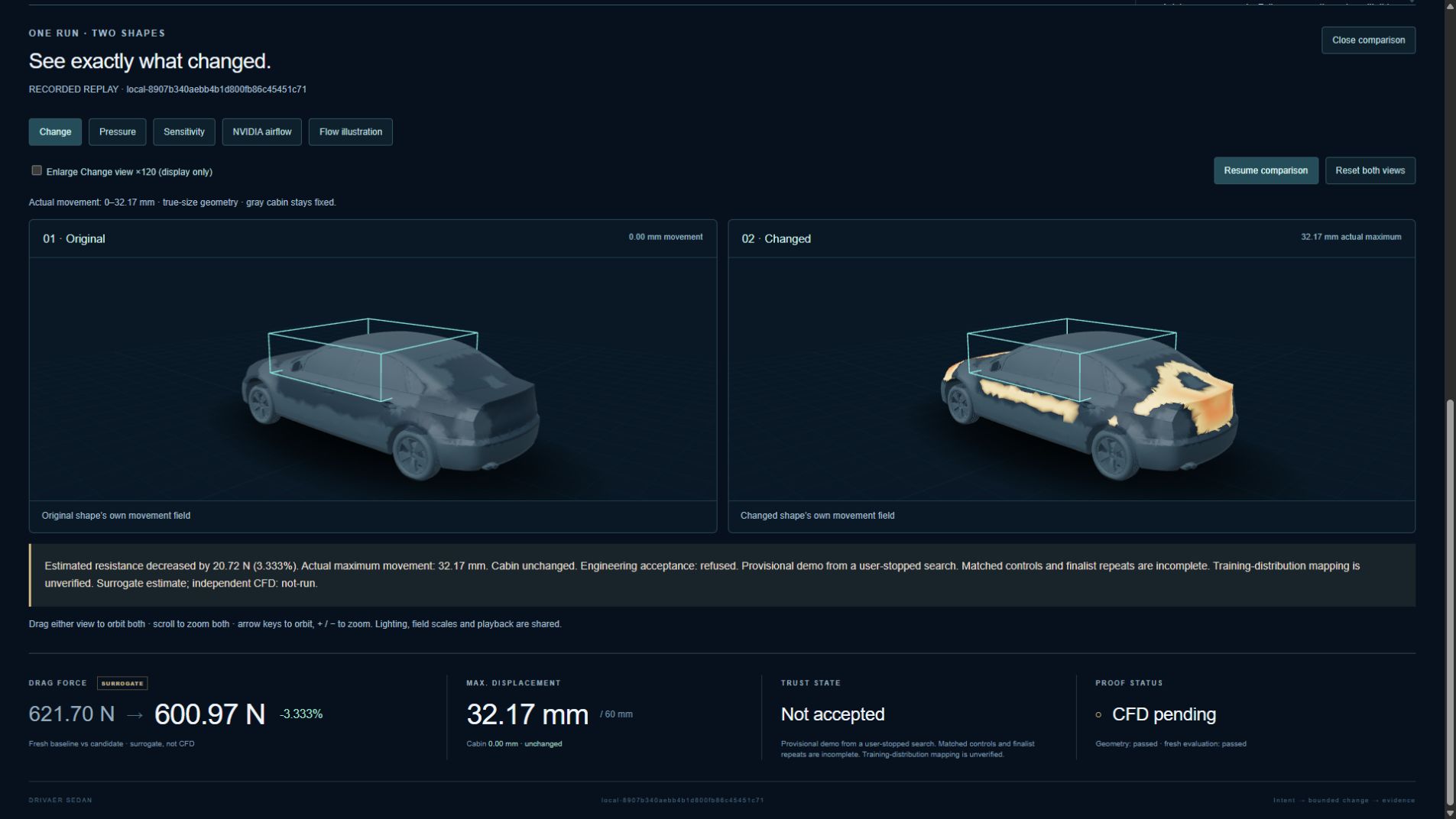
One saved sedan comparison captures the idea well: predicted drag fell from 621.6956 N to 600.9733 N, a 3.333% reduction, while the protected passenger cabin stayed unchanged. That is an interesting research result to inspect. The candidate remains unaccepted, and the reduction has not been established by independent CFD or a wind-tunnel test.
A workspace for asking questions about shape
Zephyr lets me switch between the original and changed geometry, inspect predicted surface pressure, follow airflow paths, and see where the body moved. Keeping these views connected makes it easier to relate a number to the shape that produced it.
The catalog contains nine selectable vehicles: a sedan, hatchback, SUV, wagon, coupe, sports car, van, NASA X-57, and NASA Global Hawk. They provide different shapes to explore within the same interface.
The aircraft workspace also includes an illustrative flow mode. Its orange wingtip spirals explain a flow concept; they are separate from the model’s predicted velocity field. Aircraft predictions are experimental because the DoMINO checkpoint used here was trained on cars, so these views do not establish aircraft performance.
For the car comparisons, each view answers a different question. Pressure shows the model’s predicted loading across the surface. Airflow makes the surrounding velocity field easier to inspect. The change view shows displacement, so an orange patch there means that the geometry moved. Sensitivity highlights places where the model suggests a small change might affect drag, giving me a hypothesis to test.
Animated particles help make the flow paths legible. They trace a saved, steady velocity field; their movement is a visualization of that field rather than a time-resolved flow simulation.
Giving each model a concrete job
The two AI components have different responsibilities.
DoMINO predicts the aerodynamic quantities. Zephyr runs NVIDIA’s open DoMINO .mdlus checkpoints on a local CUDA GPU. Surface predictions support the pressure and force comparison, while volume predictions provide the surrounding velocity field used by the airflow viewer. These are surrogate estimates: a trained model predicts quantities that would otherwise require a separate physics-based calculation.
Nemotron interprets the request and explains the evidence. Served through Nebius Token Factory, it translates a supported plain-language brief into a structured plan and answers questions about a completed run. It can explain what changed, what the recorded numbers mean, and why the application accepted or refused a step for further evaluation.
The geometry controller handles the actual movement of the mesh. It applies supported transformations, preserves protected regions, and checks the resulting shape. The application’s rules also decide whether a result meets its acceptance criteria. Nemotron cannot move arbitrary vertices or relax those criteria.
This division makes the interaction practical. I can describe a change in ordinary language while keeping the geometry operation and the evidence behind the answer inspectable.
From a brief to a comparison
A typical request might ask for a subtle rear taper, keep the cabin unchanged, and set a maximum movement in millimetres. In the full application, the workflow proceeds through a few explicit steps:
- Interpret the brief. Turn the request into a supported plan and expose the effective movement limit. Unsupported changes need clarification or are refused.
- Construct the candidate. Apply a deterministic deformation while preserving the mesh’s connectivity and protected coordinates.
- Check the geometry. Inspect displacement bounds, triangle quality, surface orientation, intersections, and the other constraints required by the selected workflow.
- Evaluate and compare. Run fresh predictions for the relevant geometry and present the original and candidate fields together.
- Explain the recorded result. Connect the force difference, shape change, validation outcome, and remaining questions to the same run.
The ordinary bounded-edit workflow has a 4 mm movement ceiling. The featured sedan result comes from a separate research workflow with larger, explicitly constrained morphs. Keeping those workflows distinct matters: the saved research candidate’s maximum movement was approximately 32.174 mm, so describing it as a tiny 4 mm edit would misrepresent the result.
Looking closely at the saved sedan result
The research workflow explores seven shape parameters: rear taper, deck height, hood camber, nose width, side shoulders, front overhang, and rear overhang. The selected candidate combines several of these changes while preserving the protected cabin.
| Recorded quantity | Original | Changed |
|---|---|---|
| Predicted drag | 621.6956 N | 600.9733 N |
| Difference from original | — | −20.7222 N |
| Relative change | — | −3.333% |
| Protected cabin movement | — | 0 mm |
The geometry checks passed for this candidate, and the saved replay includes freshly evaluated surface and volume fields. I can inspect the shape at true scale, compare the predicted pressure, and follow the airflow around both versions instead of relying on the percentage alone.
The search was stopped before its planned control comparisons and repeated finalist evaluations were complete. The relationship between these local shape transformations and the model’s training distribution also remains unverified, and there is no independent CFD comparison for this candidate. Those gaps explain why the application retains the lower predicted drag while refusing acceptance.
That distinction is useful in the interface itself. A promising number becomes a specific candidate with a specific next question: does the apparent improvement hold up under further evaluation?
The other saved sessions provide different comparisons. A synthetic hood dent lets me inspect a local shape disturbance and its predicted flow; it is not a crash simulation or a structural assessment. A bounded rear-taper session shows a small edit whose evidence was insufficient for acceptance. Together, the sessions show how the workspace handles different outcomes.
Bringing another car into the workspace
The full application also supports importing a car mesh. Before running a baseline, I can review its orientation, size, and prepared surface, then confirm what will actually enter the prediction pipeline. Eligible imports can proceed to a separate bounded shape test.
There is also an experimental photo-assisted path that selects and scales a catalog template. That produces an approximation to review, rather than reconstructing the exact car in the photograph. Keeping this distinction visible helps connect the prediction to the geometry that was actually evaluated.
This part of the project brought attention back to input preparation. Units, orientation, and the usable surface all affect what a comparison means. A convincing viewer needs to make those choices understandable before a calculation starts.
Keeping the evidence with the result
Zephyr records more than the final drag value. Run evidence includes geometry and model identifiers, constraints, validation results, timings, and the reasons behind an acceptance decision. Hashes bind the saved artifacts to the meshes and model checkpoint used for the calculation.
Those records also give the language interface something concrete to explain. Questions about a result are tied to that completed run, and asking for an explanation does not launch another aerodynamic calculation.
The separate static demo packages three saved sessions, recorded Nemotron answers, and downloadable evidence. It lets a reader explore those comparisons without running a GPU backend. Fresh inference, new design requests, and uploads belong to the full application.
The recorded demo and source repository are not publicly available yet. This article introduces the project and the saved results; public access will follow separately.
What I learned from building Zephyr
The most useful part of Zephyr is being able to move between a request, a visible shape change, and the evidence for its predicted effect. Each step gives the next one context.
Building that loop took work around the models: preparing geometry, defining legal changes, protecting regions, checking meshes, comparing fields, and preserving the records needed to explain an outcome. The language interface becomes useful because it can refer to those concrete results.
The saved sedan comparison is where I would start a walkthrough. It has a measurable predicted difference, an unchanged cabin, and a shape that can be inspected alongside its airflow. It also leaves a clear research question open. That is the kind of exploration I wanted the workspace to support.